A sheet metal shop drawing is technical documentation, an instruction manual, or perhaps a blueprint specifically created for the fabrication of sheet metal parts to be used in an architectural or construction project. The drawing must therefore be comprehensive enough to contain details such as material specifications, welding area, bends, hole positions, space dimensions, and so forth. For structural components that are prefabricated off-site, like sheet metal, just about everything needs to be precise to make sure that the on-site construction process runs without hiccups. Prefabricated components have to fit perfectly in the designated place and for the intended purpose to avoid potentially expensive rework.
In a typical construction project, the metal fabricators are not usually integral members of the engineering or design team. They’re subcontractors hired by the general contractor to handle the sheet metal fabrication task. Fabricators rely on metal shop drawings, which are also often created by an external drafter based on the engineer’s design drawing, to produce the parts as specified.
Even the slightest mistake in the drawing can lead to inaccurate fabrication, compromising the quality of the finished product and putting the structural integrity of the building at risk of premature failure. One of the most effective measures to bring about accuracy in a metal sheet drawing is to simply hire the right professionals to do the job. Cad Crowd is populated by thousands of talented CAD drafters who specialize in the AEC industry and are experienced in metal sheet drawings for big and small projects alike.
 Table of contents
Sheet metal drawing best practices
Whether you’re a CAD drafter or metal fabricator, there are many things you can do to make certain that all the details are correct and clearly illustrated.
Stick to DFM Guidelines
When applied to the sheet metal fabrication process, design for manufacturing services, or DFM, mainly focuses on a number of established rules of thumb as well as exceptions for typical fabrication techniques, including welding, cutting, bending, drilling, punching, and so forth. So long as the drawings are developed in conformity with DFM guidelines, you gain a lower chance of error and a higher level of accuracy.
The main point of DFM is to force engineers (and, by extension, the CAD drafter who produces the shop drawings) to consider fabrication-related matters when designing and illustrating sheet metal, so they can guide the fabricators accordingly. For example, a metal sheet shop drawing should specify the direction of the welding and when or where to use filler electrodes. If the metal part needs staggered welds, the drawing should also mention the length of every pitch, enabling the welder to avoid material warping. Specific tolerances for bending or notches must be clearly mentioned as well.
Given properly identified methods, tolerances, and limits, the metal fabricator can make an informed decision in every phase of the task. Remember that just like the product manufacturing process, metal fabrication also aims for a good balance between quality and cost. Accurate and clear shop drawings contribute to cost-efficiency a great deal. Armed with a professionally-made shop drawing, it’s possible to reduce overheads (by not using a greater amount of raw material than what’s needed), eliminate reworks (which also means no additional labor), and streamline the fabrication job of multiple parts. And at the end of the day, it improves the chances of the fabrication getting completed on time. More details about these technique-related matters are discussed below.
RELATED: Top 30 steel detailing companies for CAD drafting and engineering design services in the US
Material specifications
An engineering design expert’s plan may contain material specifications for the sheet metal parts, and it’s the drafter’s responsibility to translate and interpret the information for the technical shop drawing. There are numerous types of metal materials, from stainless steel and aluminum to tungsten and all sorts of alloys. In fact, each metal has a number of specific grades based on its characteristics, like tensile strength, corrosion resistance, durability, and more. A professional metal fabrication shop probably has a warehouse filled with tons of different metals, so be very specific about what types and grades to use. Thickness also matters, as it directly affects the materials’ ability to cope with mechanical stresses.
Finishes, such as heat treatments or coatings, may seem like nothing but superficial details, but they do serve functional purposes. For instance, powder coating actually triggers a chemical reaction that melts the powder and forms a protective layer on the metal surface. The aesthetic improvement is in addition to this benefit.
Here are some practical tips to provide proper material specifications when working in a CAD environment:
- It’s always a good idea to make use of the built-in material libraries. Just about every CAD software has a material library filled with a huge selection of materials. You can take advantage of the options for time efficiency and consistency across the fabrication documents. Don’t forget to include industry specifications or standards (like ISO or ASTM) just to make sure that the fabricator only uses materials that meet the performance requirements.
- In case you need to run an analysis or simulation, specify the material properties, including thickness, density, elasticity, tensile strength, thermal conductivity, yield strength, etc. Assuming the metal parts have to be made of an alloy not listed in the library, you have to make sure that the custom material is well-documented. Also include its properties and characteristics to inform the fabricators exactly what you need. That said, the use of brand-new custom metal alloys is pretty rare unless you’re making high-performance products like cars, weapons, or industrial equipment for engineering design firms.
- No matter what materials you choose and the associated properties, always use standardized callouts and label them with common symbols. To make things absolutely clear, include the names and grades of the materials in question. Don’t forget to mark them with any relevant codes, if applicable. If there are variations in specifications and requirements (such as edge treatments, finishing, thickness, etc.), highlight the distinctions. Some CAD applications offer color-coding features, which can help mark the difference between two or more similar things. Color-coding is useful for quick material identification.
- Whether you’re using library materials or custom materials, always attach a datasheet to inform the fabricator of their properties, manufacturer information, and special handling instructions. You can also make annotations directly on the shop drawing to give additional notes. The datasheet serves as a reference in the CAD file; it may even contain suggestions or guides on the use of possible alternative materials.
Last but not least, maintain version control of the shop drawing to keep track of any changes in material specifications. The fabricator should only receive the already-finalized shop drawing, but version control helps you manage updates during the design process. Keeping track of revision history, such as by using a unique identifier to label each drawing, would also prove to be useful during quality checks and the audit process.
Joining and welding instructions
Depending on the shape and geometry of the metal part, sometimes it’s just more practical to join two or more pieces together than to manipulate a single sheet, by either screwing or welding them together. Welding is a proven, reliable technique, but it does take some specialized equipment and skills to get everything within the tolerance for accuracy. If the shape is relatively intricate, welding can be labor-intensive, too. On the other hand, applying screws or fasteners of any sort is much simpler and even preferable, so long as it doesn’t interfere with the metal part’s geometry.
In case welding is the only feasible solution for effective fabrication, the shop drawing expert must specify in detail the types of welds, such as groove, fillet, spot, seam, slot, or plug welds. The location and size of each weld point should also be clearly defined because they may affect the design and structural integrity of the sheet metal. If necessary, annotate the shop drawing with specific instructions such as post-weld heat treatments, temperature monitoring techniques, and quality control measures. All those factors have a major impact on the overall quality of the welds and the finished part itself.
Holes and Cutouts
A sheet of metal usually serves as a single component of an assembly. It must be secured to other parts using the correct types of fasteners to ensure structural integrity. It’s crucial that the shop drawing includes accurate details pertaining to the location, shape, and size of each hole opening for proper assembly. Furthermore, some holes might need specific considerations such as chamfering and deburring; some designs require those edge treatments, whether for visual purposes or simply to prevent sharp edges.
Cutouts are no different. In addition to marking the direction (or shape) and length of cutouts, the shop drawing must inform the fabricators about the specific treatments (if any) required by the design intent. A sheet of metal typically undergoes shearing and punching treatments before it is ready for laser cutting.
RELATED: The 5 stages of prototyping for any new product idea for product design service companies
Bend specification
The key to providing accurate bending information in a sheet metal shop drawing is, first and foremost, understanding what the bends are for to begin with. Metal will deform when exposed to a strong enough force to bend its shape. In the absence of a working knowledge of how metal materials behave under mechanical stress, it would be very difficult to control the deformation. Bending is neither an additive nor a subtractive method. It’s a manipulation technique to modify the shape of metal without adding or reducing the raw material.
Every good CAD drafter has a good grasp of such concepts as k-factors and bend allowances to account for material compression and stretch during bending. The guide provided by shop drawing services allows the fabricators to make the correct calculations (or deductions) and bend the material to produce the intended shape. This is especially important in critical bends, which must adhere to strict tolerances, as they affect the part’s functionality and structural integrity a great deal. CAD software packages like SolidWorks, AutoCAD, FreeCAD, and Autodesk Inventor come with various tools to adjust (or automate) bend deductions.
Assembly information
A shop drawing must contain a list of all components required for the proper assembly of the sheet metal. This listing includes latches, hinges, fasteners (bolts, nuts, screws, etc.), and every other hardware item that comprises the finished product. The quantity of each item must be identified, too. A proper assembly uses all the listed items and nothing more.
Equally important is the assembly instruction to provide a concise step-by-step guide for the fabricator. An instruction informs the fabricator where and how to use the hardware items, the type of fastener for each hole position, the fastening specification or torque, and the correct tool for every step. The guide must be outlined in chronological order for labor efficiency. A detailed assembly guide enables the fabricator to produce a sheet metal that’s both structurally sound and accurate to the design requirement.
Arrange the view for clear communication
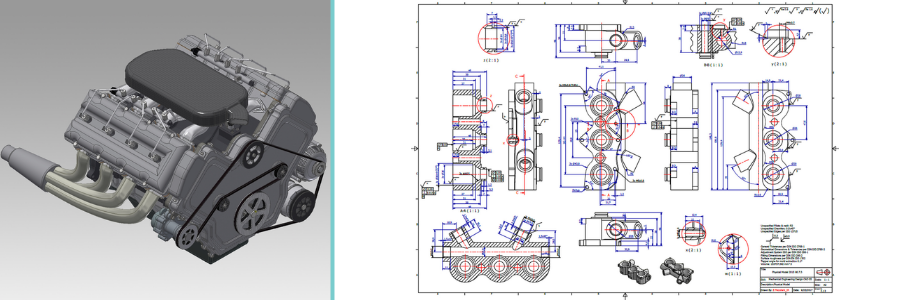
A shop drawing isn’t a site plan that contains an overview of an entire project seen from a bird’s eye perspective. It’s also not a visualization simply to showcase how the final metal parts should look when completed. When a CAD drafting expert develops a shop drawing, the final document should consist of multiple sheets of images; each illustrates the part from a particular viewing angle.
In many cases, a single sheet of metal can look like two completely different objects when observed from a different perspective; for instance, the front appears smooth and polished, whereas the back is full of rivets. A complex sheet metal with several 90-degree bends will also look different when seen from either side. Illustrating a sheet metal part from multiple viewing angles leaves no room for guesswork. Among the most common views are:
- Sectional (or cross-sectional) views: as the name suggests, the view is presented as if you’re looking at a cross-sectional slice of the assembly. The view depicts the interior detail of an assembly, allowing the fabricator to learn and understand any internal structure or mechanism of a metal part. For example, if the sheet is made of two different metals and secured with a screw from the bottom layer, the fabricator can plan the production process to compensate for the design.
- Orthographic projections: quite possibly the most intuitive illustration of part design, orthographic projections involve creating a set of three drawings – each represents a geometrical detail for the visible components. The three drawings include a top view, a front view, and a side view (either left or right). Every drawing is annotated with material specifications and dimensions to ensure accuracy during fabrication. All three drawings are usually put on the same page for easy comparison.
- Axonometric views: Like a simple visualization, an axonometric view is a pictorial drawing of the design without any annotation about dimensions. It’s supposed to be a clean illustration of the sheet metal for the fabricator to understand the orientation of each component used. Axonometric views have simplified design details and must be used in conjunction with isometric drawings for sheet metal fabrication purposes.
There are several other views in shop drawings, but the aforementioned three are by far the most comprehensive and commonly used because they can effectively communicate design intent. Many companies have started adopting 3D modeling design services to supplement the conventional CAD drawing.
RELATED: 15 engineering design constraints that product design companies & engineering firms can’t avoid
Avoid excessive details
Sheet metal shop drawings are essentially instructions for fabricators to produce metal parts. They contain information about material specifications, dimensions, welding techniques, finishes, types of fasteners, and assembly. You can annotate every single component with loads of data in the hope of making things absolutely clear, but sometimes this approach triggers the opposite effect. Instead of being clear, the drawing becomes cluttered and overloaded with details. Missing information is undesirable, but excessive details are no different. Therefore, you should only include details relevant to the fabrication process, nothing less, nothing more.
Takeaway
Engineers and drafters often get carried away to get everything right the first time, when in reality it may take a few rounds of revision until everything is exactly as it should be. Revision isn’t supposed to be a dreadful hurdle; it’s an unavoidable part of a construction project. In fact, you should expect revisions if all the teams and stakeholders involved in a construction project play their roles professionally. Let’s not forget that converting the original design drawings into the more technical sheet metal fabrication plans isn’t as straightforward as it may seem. It’s an iterative process filled with reviews, modifications, refinements, and ultimately approval.
A lot of details must be addressed before the drawing makes its way to the fabrication shop floor. Only when the metal fabricator gets all the required information and is actually capable of translating it into a series of feasible fabrication processes may the actual work begin. But then again, it’s not the fabricator’s job to prepare the details and deliver them in a comprehensive drawing; the responsibility falls on the drafter. Get a free quote today.
The post How to Detail Sheet Metal Shop Drawings for Increased Fabrication Accuracy for Companies first appeared on Cad Crowd.